
|

 SIRAS Newsletter November 2026
IMPORTANT Information for all users in SIRAS
-
Updated the Service Log Minutes Report: Now uses current and archived student records to estimate expected minutes, reflecting service changes during the selected reporting period
-
Transferring Students between the Special Education (IEP) and 504 Modules: When a student is exited from an IEP and the team wants to pursue a 504 assessment, wait until the next day at minimum after the meeting is finalized before transferring the file to the 504 module. This allows for the data to be pushed from SIRAS to both your Student Information System and CALPADS with fewer errors. If a student with an active 504 is being recommended for a Special Education Assessment, go to the MIS Summary page and click on “Referred for Special Ed”. The recommendation is to set the record to be viewable on both the IEP module and 504 module while the assessment is being conducted. No 504 documents will be able to be created within the system at this time. If needed, use the blank forms in the Document Library and upload to the student’s file. Click here for further directions.

-
CAASPP and ELPAC supports for 2026-2027 have been updated by the CDE with minor changes this year which will be reflected in updated SIRAS menus.
-
Preschool Strategies and English Language Assessment SIRAS forms: Reminder, to access the English Language Assessment form, check the box at the bottom of the Preschool Strategies form. Document your discussion in the IEP meeting notes as well.
-
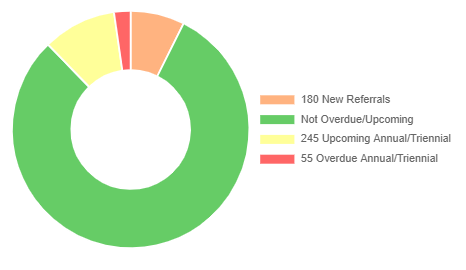
Use the Student Data Overview links on your home page to monitor your caseload. Review your students who have overdue or upcoming meetings (annuals due within the next 30 days and triennials due within the next 75 days). Ensure that meetings are scheduled, held, and finalized in a timely manner. Don’t forget to check the orange section for Initial evaluations which were started. If the assessment was not consented to by the parent, the district should respond with a PWN and the meeting should be abandoned. If the meeting has been completed and parent has consented to services, it’s important to finalize the meeting and begin serving the student.
-
Plan your IEP calendar now if you haven’t already. Work with your team to stay within the IEP timelines, including when the need to reschedule arises. Document your attempts to schedule the meeting with the parent. Be mindful of the dates when both an annual and re-evaluation are due so that the earlier date is met and both types of meeting are compliant. Work with your District Administration regarding IEP continuations and when they are appropriate to use. Schedule and hold continuations within a reasonable time period.
-
Change the SIRAS Default Student List to a Custom List. The Student List under the Reporting menu shows the default student list. You can create your own custom list and set it as the SIRAS default by going to Reporting > Student List, selecting the Edit List tab, building the list with the fields you want, saving it using My Saved Field Sets below, selecting your saved list, and clicking Unset as my default list button. Your custom list will then appear as the default whenever you open the Student List under the Reporting menu. This feature is available on all modules.

-
Transition Services: Please remember that Transition to Adult Life services must be part of your FAPE offer and listed on the Services page of the IEP when you are completing your Transition to Adult Life pages. As with any other services, there must be a goal attached. You can refer back to the slides from the SELPA training and to the instructions behind the blue question mark on those pages for more specific information.
-
Review your open meetings regularly. Finalize IEP meetings as quickly as possible, right after parent consent has been received. Finalized IEPs are sent to CDE as they occur throughout the year. The absence in reporting of a timely IEP meeting appears late.
-
DRDP Training: Reminder that there is a new version of the DRDP this year and all those who will be administering it must complete the training. You can find the information at this site. Once the grade level band training is completed, Kingston’s Learning Journey will become available to complete.
-
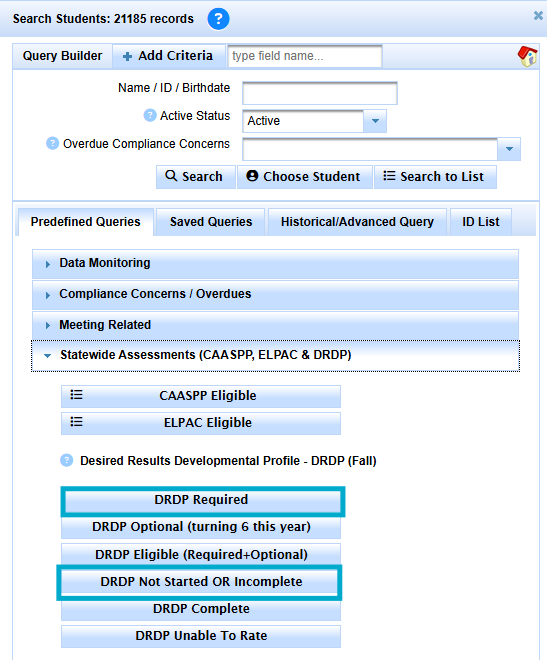
Review your list of DRDPs that need to be completed. You can run your list by clicking Search to bring up the query box>open the predefined Queries tab>open the Desired Results Developmental Profile -DRDP (Fall) section>Select “DRDP Required”. Your DRDPs should be entered into SIRAS by November 20, 2026 (unless your district has given you another due date specific to your school calendar) so your students’ growth can be seen on the Spring DRDP. Remember to use all available data and to avoid having any students listed as “unable to rate” on all items.
-
IEP Implementation Monitoring: CDE will again be looking at services provided during the months of January and February. Districts will receive a random sampling of students and will be required to report on what percent of services were provided. Follow your District guidance for logging services. A refresher on how to use SIRAS service logs can be found on slides 29-44 of this presentation.
IMPORTANT Information for SIRAS Data Administrators in SIRAS
-
Student Privacy and PII: Please remind everyone to communicate using student SSID, particularly when not using encrypted email. If a teacher sends an email with PII, please replace with ID before forwarding to us.
-
Please continue to send data to ensure that all reportable data pieces are in CALPADS for Fall 1 reporting. No reporting block date is needed for Census Day. SIRAS has the reporting lock set to the end of the current school year.
-
Review CALPADS Fall 1 snapshots. Compare these reports to those you saved on Census Day. Make any needed changes to SIRAS records and send/re-send to CALPADS.
-
Schedule SELPA and/or SIRAS Fall 1 review meetings now. Follow the Data Monitoring Procedures posted on the Happy Fox Support Center prior to meeting with SELPA.
-
A list of 2026-2027 SELPA Reporting Due Dates is linked here. In addition, reference the CDE Fall 1 2026 Roadmap
-
Fall 1 LEA Approval is upon us. Refer to the suggested SELPA due dates and collaborate within your LEA to ensure that all data will be in CALPADS prior to LEA approval. Review problem-solving resources on posted on the preparing for Fall 1 happy fox page, Process for Error Resolution and direct error help CALPADS Error Resolution.
-
Program settings and percent of time in general education will be used to calculate the district’s LRE indicators using Fall 1 data. It is important to review them for accuracy, specifically for the Preschool/TK/K students. Please work with your District team to make sure your data is accurate. Districts should reach out to SELPA if they have questions about Program Setting and Indicator 6. Program Setting Help
-
Finalize as many IEP meetings dated on/prior to 10/7/26. Ensure that the meeting data is posted to CALPADS for Fall reporting. Make sure that meetings in progress as of that date are reported to CALPADS if the meeting is not ready to finalize.
-
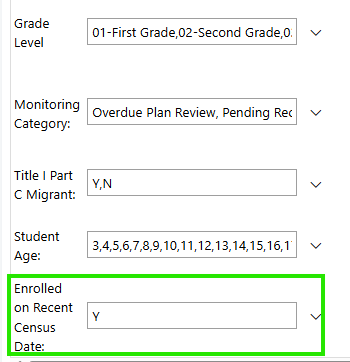
Review your meeting delay reasons as of Census Day, 10/7/2026, using the 16.21 CALPADS report. You can filter the list to run 16.21 with just those students enrolled as of Census Day. All students on the reports should have valid meeting delay reasons prior to your LEA approval.
-
Utilize the data tracking worksheet to summarize CALPADS reports for review with SELPA and your director.
-
The deadline for Fall DRDP data in SIRAS without errors is December 11, 2026. Backwards map these due dates as needed for your district’s calendar. Report students with all Unable to Rate on the DRDP Exception list (check with SELPA as these should be very rare) and access DRDP Help on the Happy Fox User Manual.
~ SIRAS IS a Medi-Cal Billing system ~
- let us show you how it works.

 One Company. One Solution.
A Smarter Future for District Medi-Cal Billing through SIRAS
With SIRAS and Medical Billing Technology (MBT) together, you get one comprehensive solution designed to streamline processes and strengthen student support. >> learn more <<
For more information, contact: W: www.mbt4schools.com E: info@mbt4schools.com P: (559) 627-6267
- Greater resources
- Expanded services
- No double data entry
- Stronger solutions
~ Let us assist with the backlog of your IEP translations ~
 IEP Translations Services
EVEN MORE NEWS! SIRAS offers - Next Level Translation Services has now the resources to translate IEP and assessment reports into ANY language. We offer high quality translations in any language with fast turnaround. Contact steve@sirassystems.com for more information or click the links below:
>> Click here for Translation Request Process <<
Instant quote for Spanish IEP translation available for District Sped Clerks
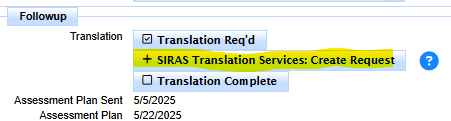
Sped Clerks can check on the status of their requested translations by selecting Translations Requests under the Tools menu.